MePic-AI Photo Video Generator
- 4.5
- Rating
- 5.00M
- Installs
- Free
- Price

 Analysis by App-foxy
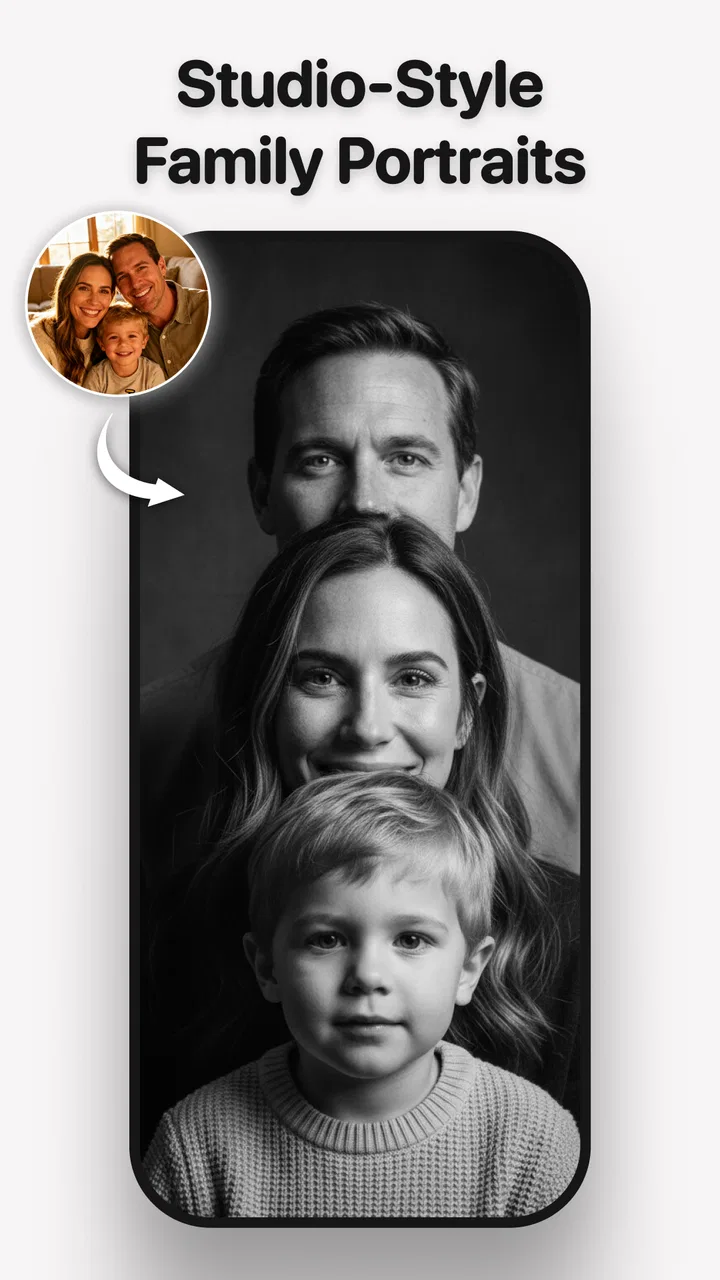
I approached MePic-AI Photo Editor, Video as an everyday creative tool rather than a replacement for a full desktop editor. It is a free Art & Design app from Ocean Float Mobile, built around AI photoshoots, pose creation, avatars, and art-style filters. That combination makes it especially interesting for people who want to experiment with images without learning a complicated editing workflow first.
My overall impression is positive, but not uncritical. The app is quick to understand, visually focused, and suited to short creative sessions. It can help turn an ordinary portrait into something more playful or polished, and it gives people a way to explore visual ideas when drawing or manual retouching would take too much effort. At the same time, AI editing is not equally comfortable for every user or every situation. The experience depends heavily on visual interpretation, precise choices, and tolerance for results that may need several attempts.
How MePic feels to use in real life
I focus on what happens after you choose a portrait: the app’s AI-led transformation is designed to turn a photo into a different visual direction, rather than ask you to build the result by hand. In practice, I’d treat each output as a draft and compare it against the image’s intended purpose. That distinction matters most when deciding whether a playful reinterpretation is enough or whether you need precise, faithful editing.
You May Also Like

 Blood Strike: 2.5 Anniversary
Blood Strike’s Loadouts Turn Every Drop Into a Tactical Gamble
A close look at Blood Strike’s custom loadouts: how fast access to signature weapons reshapes its battle royale rhythm, rewards preparation, and narrows the gap between fights.

 Pandora - Music & Podcasts
Pandora’s Music Is Easy to Start, but Harder to Recover
Pandora’s strength is its low-effort path from a seed to a station. Its weak spot is how much confidence it asks you to place in connection, setup, and quiet recovery.

 8 Ball Pool
 Is Built on Rivalries, Rematches, and Routine
A close look at the rivalries, rematches, shared routines, and unanswered safety questions that turn a quick pool match into a persistent mobile community.

 Samsung Music
’s Quiet Strength Is Playing What You Already Own
Its reach comes less from spectacle than from dependable access to a personal library. That simplicity is both the app’s strongest retention engine and its ceiling.

 AccuWeather: Weather Radar
AccuWeather Review: A Quick, Clear Forecast for Everyday Decisions
For everyday plans, the best forecast is the one you can understand quickly. AccuWeather makes rain timing, radar, and local conditions easy to act on, with a few trade-offs.

 Hill Climb Racing
Why Hill Climb Racing Still Turns Crashes Into One More Run
A tiny car, a bumpy hill and one more upgrade: Hill Climb Racing keeps resurfacing because its simple chaos makes every near-miss feel personal.
More From Our News Desk



Readability and navigation for quick creative sessions
The strongest part of the experience is the directness of its purpose. Instead of presenting itself as a traditional editor filled with timelines, layers, brushes, masks, and adjustment panels, MePic focuses on the idea of transforming a photo. That matters for somebody who wants a result for a profile image, a message to a friend, a social post, or a personal experiment rather than a carefully controlled production file.
I found this kind of design easier to approach than a conventional photo editor because the creative decision comes first: choose a portrait direction, a pose idea, an avatar treatment, or an art filter. The app’s identity is clear from the beginning. For a first-time user, that reduces the intimidating feeling that often comes from opening an editor and seeing a wall of unfamiliar tools.
The visual nature of the app is also a consideration for readability. Creative apps often communicate through image previews and icons, so users who need strong text contrast, larger labels, or very explicit instructions may find some choices less immediately obvious than they would in a text-led utility. I would recommend taking a little time to identify what each control changes instead of tapping quickly through every option. That small pause helps avoid confusing a style decision with a pose or portrait adjustment.
MePic is best understood as a guided playground. I would not open it expecting the same predictable navigation as a file manager or note-taking app. The app encourages looking, comparing, and trying again. That is enjoyable for users who like visual discovery, but it can feel less efficient when the goal is simply to correct one small detail in an image.
One useful habit is to begin with a clear source photo and a specific goal. If I want a professional-looking avatar, I should not start by testing every dramatic effect. I get more useful results by deciding whether I want a clean portrait, a stylized illustration, or something deliberately imaginative. This makes the interface feel less overwhelming and gives each preview a purpose.
Motor and sensory considerations
AI-based editing can be helpful for people who find manual retouching physically tiring. Traditional editing may require repeated dragging, detailed selections, tiny controls, or long periods of steady attention. MePic shifts much of that work toward choosing an intended result. For someone who has limited patience for fine motor tasks, that can be a meaningful advantage.
It is also useful for users who do not feel confident drawing. Creating an avatar or an art-inspired image does not require starting with a blank canvas and controlling every stroke. The app offers a more approachable route into visual creativity: begin with a photograph and explore how it can be reinterpreted. That lowers the skill barrier without making the activity feel entirely passive.
There are trade-offs. A person with hand tremors or difficulty with repeated tapping may appreciate fewer manual editing steps, but still encounter friction when comparing previews, selecting a precise option, or repeating a generation until the result feels right. The app’s convenience does not remove the need for interaction; it changes the kind of interaction required.
Sensory comfort is another personal issue. Strong visual effects, unusual faces, dramatic transformations, and highly stylized filters can be exciting, but they may also be tiring for people who prefer calm, predictable imagery. I would use the app in shorter sessions if intense visual changes become uncomfortable. Starting with restrained portrait treatments rather than the most dramatic art styles is a sensible way to test whether the experience suits you.
For users with vision-related needs, the practical question is not only whether the controls can be read, but whether the generated result can be judged comfortably. Small changes in facial structure, pose, lighting, or style may be difficult to evaluate if you rely on magnification or need strong visual clarity. In that situation, MePic may work better as an idea generator than as the final quality-control tool. I would inspect important images in a separate viewer with the display settings that feel most comfortable.
People who are sensitive to unexpected changes should also keep the original photograph. AI transformations can move away from the source in ways that are visually appealing but not necessarily faithful. Keeping the unedited image gives you a safe reference and prevents an experimental result from becoming the only copy of a meaningful photo.
Situational access: when the app is genuinely useful
A realistic use case is preparing a new profile picture during a short break. I might have one decent portrait but no time, equipment, or interest in arranging a formal photoshoot. MePic gives me a way to explore a cleaner pose, a more expressive presentation, or an illustrated version of the same image. The benefit is not that every result will look perfect; it is that I can test several creative directions without setting up a camera session.
The app can also help when someone wants a visual starting point for a project. A writer planning a character, a small creator imagining a channel identity, or a student preparing a mood board may use an avatar or art treatment to explore tone. In these cases, the output is valuable even when it is not publication-ready. It helps answer questions such as whether a character feels friendly, mysterious, playful, or formal.
For people who find conventional photography stressful, pose-focused tools may make the process less demanding. Instead of having to perform a pose in front of a camera and repeat it physically, a user can experiment with the visual idea through an existing image. That does not replace authentic photography, but it can make self-presentation feel more approachable.
MePic is also a practical option for casual social communication. An avatar can make a group chat image, a playful greeting, or a personal account feel more distinctive. The app’s free entry point is important here: users can try the creative workflow before deciding whether it deserves a regular place on their phone. The app is rated for Everyone, which makes its general creative focus accessible to a broad audience, although adults should still guide younger users in how they share personal photos online.
Its popularity suggests that the concept has found a substantial audience. MePic has passed a million installs and holds an average rating of 4.3 from around fifteen thousand ratings. I read that as evidence that the basic idea works for many people, not as a guarantee that every device, photo, or accessibility need will produce the same experience.
Three workflows that make the app more useful
The first workflow I recommend is the “reference before style” approach. Start with the least dramatic transformation that matches your goal, then compare more artistic options afterward. This makes it easier to notice whether the app is improving the presentation of the original image or simply replacing its character with a strong visual effect. It is particularly helpful when you need a believable avatar rather than an obviously artificial one.
The second is to separate exploration from selection. During the first session, save or note the kinds of results that feel promising instead of immediately trying to perfect one image. On a later pass, judge the strongest candidates for a specific purpose: profile use, personal art, a character concept, or a casual message. This reduces decision fatigue and prevents a visually exciting result from being chosen for a task it does not actually suit.
The third is to use pose creation as a planning tool, not only as a finishing effect. If I am unsure how I want a portrait to feel, I can use the pose concept to think about posture, expression, and framing before worrying about decorative filters. That is a less obvious benefit because it turns the app into a visual rehearsal space. It can help users who struggle to explain an image idea in words.
These workflows also show where MePic differs from usual alternatives. A standard photo editor is better when I need exact control over brightness, cropping, color, blemish removal, or individual objects. A drawing app is better when I want to build an image from scratch and control every mark. A camera app is better when the priority is capturing a natural moment. MePic sits between those options: it is more guided than a blank canvas and more imaginative than a basic correction tool.
Remaining barriers and practical limitations
The biggest limitation is control. AI can produce an appealing direction quickly, but it does not give me the same certainty as manual editing. If a particular facial detail, body position, clothing element, or background must remain exact, I would choose a more traditional editor. MePic is strongest when interpretation is welcome and weaker when accuracy is non-negotiable.
There is also a learning curve hidden beneath the simple presentation. The controls may be easy to start, but judging why one output feels better than another takes practice. Users need to learn how source-photo quality, expression, framing, and style intensity affect the result. A disappointing image does not always mean the app failed; it may mean the starting photo and chosen treatment do not work well together.
The free price makes experimentation easy, but in-app purchases range from $4.99 to $119.99 per item. That is important for anyone who may be tempted to keep trying variations. I would treat paid options as a deliberate decision rather than an automatic part of the workflow. Set a personal limit before exploring premium-looking choices, especially if you are using the app for casual entertainment rather than a project with a clear purpose.
Users should also think carefully about privacy in a general, practical sense whenever they work with personal portraits in a creative service. I would avoid uploading images containing other people unless they have agreed, and I would be especially cautious with children’s photos or images that reveal private locations. That is not a criticism unique to MePic; it is a sensible boundary for any photo-transformation tool.
The app is currently at version 2.8 and runs on Android devices using version 6.0 or later. That broad operating-system reach is convenient for people with older compatible phones, although creative processing can still feel more comfortable on a device with a larger display and enough free space for image work. A smaller screen may make visual comparison harder, particularly for users who already need magnification or prefer larger interface elements.
Another barrier is expectation management. The store summary presents a perfect AI photoshoot, but I would not interpret that as a promise of flawless results from every input. The word “perfect” describes the creative ambition more than a result I would assume automatically. The best experience comes from treating each generation as a draft and choosing the result that serves the intended use.
Who should use it, and who should choose something else?
I would recommend MePic to someone who wants fast visual experimentation, enjoys avatars and art filters, or feels blocked by the technical side of conventional editing. It is a good fit for casual creators, profile-image updates, character exploration, and people who want to make a portrait feel more expressive without learning a large toolset.
I would also suggest it to users who benefit from reducing physical drawing and retouching work. The app can make creative participation easier when manual precision is tiring or when starting from a blank canvas feels inaccessible. Its guided approach gives a user something concrete to react to, which is often easier than inventing an image from nothing.
I would skip it, or use it only as a first step, if you need professional color management, exact layer control, detailed masking, reliable text placement, or a fully natural portrait. In those cases, a dedicated photo editor will be more dependable. If you need a camera-first experience with minimal transformation, a standard camera app is also the better choice. MePic is not trying to be all of those tools at once, and its value drops when the task depends on precision rather than interpretation.
For users with significant visual, motor, or sensory needs, I would approach it as a trial rather than assume it will fit. The reduced need for manual editing may help, while image-heavy navigation and repeated visual comparison may create new difficulties. The most inclusive way to use it is to keep sessions short, preserve original images, adjust the phone’s display settings when needed, and use another app for final inspection or detailed corrections.
My inclusive verdict
After looking at both its creative strengths and its practical barriers, I see MePic as a friendly entry point to AI-assisted image making. Ocean Float Mobile has focused the app on a clear experience: take a portrait idea, explore a pose or avatar direction, and turn it into something more stylized. That focus makes it less intimidating than a full editor and more useful than a simple collection of decorative filters.
Its accessibility value comes mainly from reducing the amount of manual artistic labor. Someone who cannot easily draw, retouch, or arrange a complex composition can still participate in visual creation. Someone who needs a quick result can move from an ordinary photo to a more distinctive image without building the whole effect by hand.
Still, inclusive design is not only about making creation easier. It is also about making choices understandable, results comfortable to inspect, and costs easy to control. MePic works best when users approach it with realistic expectations, retain their originals, and know when to move to a more precise tool. The experience is less suitable for people who need predictable edits or who find fast-changing visual previews tiring.
For me, the app earns a recommendation as a creative companion, not as a universal photo editor. Its free access makes trying it straightforward, its Everyone rating broadens its audience, and its growing user base shows that the concept is appealing. The most important question is whether you want guided experimentation or exact control. If you want the former, MePic-AI Photo Editor, Video is worth exploring. If you need the latter, use it for inspiration and finish the job elsewhere.
FAQs for MePic-AI Photo Video Generator
01What features does MePic-AI Photo Editor, Video offer?
MePic-AI Photo Editor, Video provides a comprehensive suite of editing tools powered by artificial intelligence. Users can enhance photos with filters, retouch portraits, and create stunning videos with transitions and effects. The app also offers AI-driven tools for background removal and automatic adjustments, making it easy for both beginners and advanced users to produce professional-quality content.
02Is MePic-AI Photo Editor, Video free to use?
MePic offers a free version with basic features, but to access the full suite of advanced tools and premium content, a subscription is required. The subscription unlocks additional filters, effects, and higher resolution exports. Users can opt for monthly or yearly plans, and there is typically a free trial period to explore the premium features.
03What are the system requirements for installing MePic-AI Photo Editor, Video?
To install MePic-AI Photo Editor, Video, your device must be running Android 7.0 or iOS 12.0, or later versions. The app is optimized for both smartphones and tablets. Ensure you have sufficient storage space, as editing high-resolution photos and videos may require additional memory for smooth operation.
04How user-friendly is MePic-AI Photo Editor, Video for beginners?
MePic is designed with an intuitive interface, making it accessible for users of all skill levels. Beginners will find the AI-powered tools particularly helpful, as they simplify the editing process with automatic enhancements and suggestions. The app also offers tutorials and guides to help new users quickly learn and make the most out of its features.
05Does MePic-AI Photo Editor, Video support social media integration?
Yes, MePic-AI Photo Editor, Video offers seamless integration with major social media platforms like Instagram, Facebook, and TikTok. Users can directly share their edited photos and videos from the app, ensuring quick and easy publication. Additionally, the app provides social media-friendly export options to optimize content for various platforms.
Pros
- Intuitive and user-friendly interface.
- Wide range of AI-driven editing tools.
- Fast processing for photo and video edits.
- Regular updates with new features.
- Supports multiple file formats.
Cons
- In-app purchases for advanced features.
- Occasional crashes on older devices.
- Limited free version capabilities.
- Some features need strong internet.
- Ads can be intrusive at times.

MePic-AI Photo Video Generator
Gallery